
One Big Word
Fugo GamesWord
0.00.00 Reviews
- Version
- 0.1.10
- Installs
- 10.00K
- Age Rating
- Everyone
Screenshots
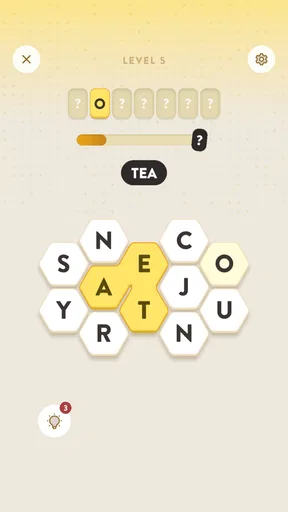
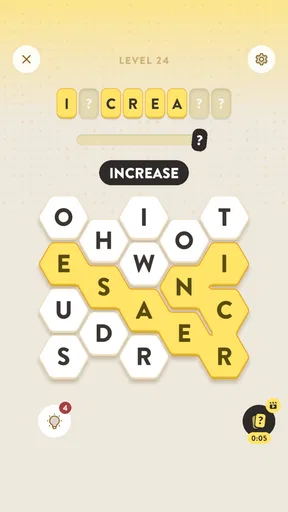
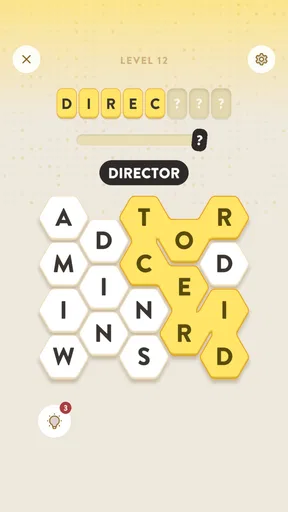
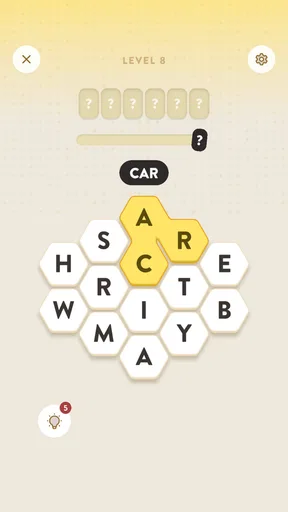
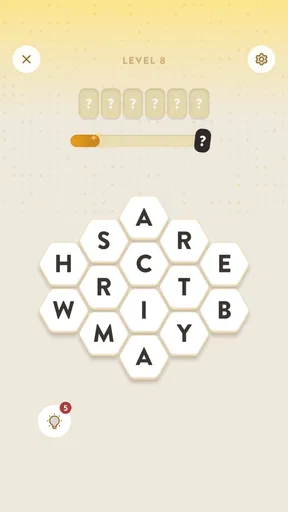
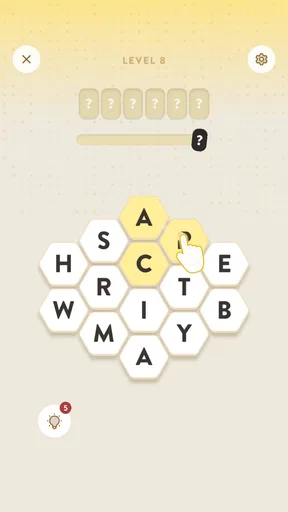
Our Review of One Big Word
 Analysis by Appyee
I approached One Big Word as a quick word game rather than a long-form puzzle adventure, and that distinction matters. Its central idea is easy to understand: each level points toward one larger target word, while the player searches for smaller words along the way. In practice, the appeal comes from deciding which word possibilities are useful and which are distractions. It is the sort of game I can open for a short mental break without first learning a complicated rule set.
Developed by Fugo Games, this free word title is aimed at Everyone and runs on Android devices using Android 8.0 or later. The current version is 0.1.10, and the game has passed the ten-thousand-install mark. Those details suggest a relatively focused experience rather than a huge, established word platform, so I would approach it as a simple puzzle to try rather than as a replacement for a broad word-game collection.
Getting past the first points of friction
The first place a player can get stuck is not necessarily inside a difficult puzzle. It can happen before the game feels comfortable. A word game needs to make its basic interaction immediately clear: what counts as a small word, how those words connect to the larger answer, and what to do when a guess is rejected. If the opening moments leave any of those questions unclear, the player may assume the puzzle is broken when the real issue is simply an unfamiliar input habit.
My practical advice is to spend the first few levels learning the game’s vocabulary rather than trying to solve everything at maximum speed. Test ordinary short words first, then notice how the level responds. This gives you a working sense of the accepted word length and the relationship between the smaller discoveries and the final target. It is more productive than immediately throwing in obscure words and deciding that the game is being inconsistent.
The store summary describes the experience as finding small words to reach one big word, so the main challenge is not conventional clue solving alone. You are also managing the path toward a larger answer. That makes the game different from a basic anagram app, where the goal is often to empty a fixed letter rack, and from a crossword, where every answer is anchored by a clue and crossing letters. Here, the useful question is often, “What kind of larger word could these discoveries be leading toward?”
The most useful early habit is to treat every accepted word as evidence, not merely as a point. A short word can reveal the likely letter family, the theme of the level’s construction, or the direction in which the target is developing. Even when the game does not explain its design in detail, this mindset reduces random guessing and makes the puzzle feel more deliberate.
Setup checks before blaming a puzzle
Because the game requires Android 8.0 or newer, compatibility is the first sensible check on an Android phone or tablet. If the app cannot install, closes before reaching the puzzle, or behaves strangely during launch, I would first confirm the operating system rather than repeatedly reinstalling. A device that is below the minimum requirement is not a good place to diagnose gameplay behavior.
I would also make sure the installation has completed normally and that the device has enough free working space for ordinary app operation. That is general phone maintenance, not a special requirement I would attribute to this game. Closing other demanding apps before trying again is another harmless check, especially on an older device. These steps do not change the word mechanics, but they help separate a technical start-up problem from a level that is genuinely challenging.
For anyone deciding whether to spend money, the game itself is free, while its in-app purchases range from $1.49 to $5.99 per item. I would begin without buying anything and first decide whether the central word loop suits me. A purchase makes sense only if the game has already earned regular space in my routine; it should not be the first troubleshooting step when a level feels confusing.
The Everyone content rating also makes the game a reasonable candidate for shared casual use, including a family member who wants a quieter puzzle. That does not mean every player will enjoy it equally. Younger players may need help with vocabulary, while adults who prefer cryptic clues or very demanding word construction may find the presentation too light. The age rating describes suitability, not difficulty or depth.
How I recover when a level stalls
When I reach a level that seems to stop moving, I avoid repeating the same guess with minor spelling changes. Instead, I reset my approach mentally. I look for common short words, consider different grammatical forms, and then return to the larger target. This two-pass method is more reliable than focusing exclusively on the biggest word from the start, because the smaller discoveries are the game’s intended route toward it.
A useful workflow is to separate certainty from speculation. Words that the game accepts are certain. Words that merely look plausible remain hypotheses until tested. Keeping that distinction prevents one attractive but unlikely target from dominating the entire attempt. If I have been pursuing a long word for several moves without gaining confirmation, I step back and search for simpler combinations again.
Another practical technique is to change the pace of play. Fast tapping encourages familiar words and can make a player overlook a less obvious but still ordinary option. Slowing down for a few seconds before each attempt gives me time to inspect the available letters or arrangement, depending on how the level presents the puzzle. I do not treat this as a secret mode or advanced feature; it is simply a better way to use the information already on screen.
If the interface appears not to register an input, I would try the same action once more with deliberate timing, then leave and reopen the game if the problem continues. I would avoid repeatedly tapping or making many guesses while the screen seems unresponsive, because that can make it harder to tell whether the issue is the game or the phone. A clean restart is a sensible recovery step for a casual title, provided I am not assuming that it will restore unsaved progress.
That last point is important for expectations. I would not treat a restart as a guaranteed way to preserve or recover a level. If a particular puzzle matters to you, finish the current interaction carefully before closing the app. The safest habit is to use reopening as a basic response to a temporary display or input problem, not as a substitute for a save system.
When the app may not be the cause
Word games expose a different kind of difficulty from action games. A player can feel that the app has failed simply because the intended word is outside their everyday vocabulary. That is especially likely when the level’s larger target is not immediately visible. Before deciding that an answer is missing, I check whether I am relying on a spelling variant, an abbreviation, a proper name, or a word that the game may not recognize as ordinary vocabulary.
This is where One Big Word may suit one player and frustrate another. Someone who enjoys experimenting with language can find the uncertainty satisfying. Someone who wants every puzzle to provide a precise clue may prefer a crossword or a clue-based word app instead. Those alternatives usually tell you more clearly what kind of answer they expect, while this game’s attraction is the gradual movement from smaller words toward a larger one.
Keyboard behavior can also create confusion. If the phone’s touch input is registering slowly, missing taps, or placing pressure in the wrong spot, the game may appear to reject correct attempts. I would test the device in another simple text field before judging the puzzle. If typing or tapping is unreliable elsewhere, changing the game will not solve the underlying problem.
Likewise, a temporary phone slowdown, an interrupted installation, or an operating-system issue can affect launch and responsiveness. The useful diagnostic question is whether the problem follows the game or follows the device. If other apps show the same behavior, I would focus on the phone first. If only this title misbehaves after a normal restart and a clean installation, then the app becomes the more likely source of the trouble.
I also would not confuse a quiet design with missing content. One Big Word is presented as a focused word game, not as a general-purpose dictionary or a lesson in vocabulary. If you are looking for definitions, pronunciation help, word history, or a large reference database, a dedicated dictionary will serve you better. The game’s purpose is to make you search and connect, not to explain every word in detail.
Where it fits into an ordinary day
The strongest use case for me is a short waiting period: sitting before an appointment, taking a break between tasks, or winding down without starting a large game. A level built around one central word gives the session a clear boundary. I can attempt a few smaller words, decide whether I am making progress, and stop without feeling that I have abandoned a complicated campaign.
It can also work as a low-pressure shared activity. One person can suggest a small word while another thinks about the larger destination. That makes the game more conversational than a solitary score chase, even though the basic interaction remains individual. The limitation is that players with very different vocabularies may not experience the same level evenly; one person may see the route quickly while another is still testing common words.
For study, I would use it only as a light vocabulary prompt, not as a structured learning tool. The game can encourage attention to spelling and word relationships, but the available facts about it do not establish a teaching curriculum or explanatory system. If your goal is exam preparation, language instruction, or systematic vocabulary growth, an educational app with definitions and review scheduling is the better choice.
Compared with anagram games, this title appears more goal-oriented because the smaller words serve a larger destination. Compared with crosswords, it offers less dependence on written clues and crossing entries. Compared with endless word searches, it has a clearer sense of arrival because each level is organized around one big answer. The trade-off is that players who want extensive customization, deep clue variety, or competitive systems may find this narrower format limited.
Who should try it, and who should skip it
I would recommend giving it a chance if you like compact word puzzles, prefer learning a game through experimentation, and want something that can fit into short sessions. It is also a reasonable option for players who enjoy the satisfaction of discovering a structure gradually instead of receiving a full clue immediately. The free entry point makes that test easy, as long as you remember that optional purchases are available.
I would skip it if you need a guaranteed offline routine, a detailed hint system, a dictionary-style explanation for every answer, or a highly competitive progression structure. I would also look elsewhere if your favorite word games depend on rich narrative, elaborate visuals, or long strategic planning. Nothing about the core concept suggests that it is trying to be those things, and judging it by those standards would lead to the wrong conclusion.
Players sensitive to uncertainty should begin with modest expectations. The pleasure here comes from working out the relationship between small and large words, so some levels may feel less transparent than a conventional clue puzzle. If you dislike trying possibilities without immediate confirmation, that friction may outweigh the simplicity of the controls. On the other hand, if you enjoy a little ambiguity and can treat wrong guesses as useful information, the same design choice becomes the main attraction.
My practical verdict after using the concept as intended
One Big Word is best understood as a focused, free word game from Fugo Games that turns a familiar vocabulary exercise into a search for a larger destination. Its strongest quality is the compact relationship between discovery and goal: smaller words are not just isolated answers, but steps toward the level’s main word. That gives short sessions more direction than a completely open-ended word search.
Its main weakness is also tied to that design. Without the clear clue structure of a crossword or the fixed letter certainty of some anagram games, a stalled level can feel ambiguous. Players need to be willing to test ordinary possibilities, observe what the game accepts, and change strategy when a favorite guess is not producing progress. Technical problems should be checked separately through compatibility, installation, input, and restart steps rather than blamed on the puzzle immediately.
At no cost to start, with an Everyone rating and support for Android 8.0 or later, it is easy to try for a few casual sessions. I would keep purchases out of the decision until the basic loop proves enjoyable, especially since individual items cost between $1.49 and $5.99. My recommendation is positive but specific: choose it for short, language-focused breaks and gradual word discovery, not for a full dictionary, a formal learning course, or a feature-heavy puzzle platform.
Verdict
Strengths of One Big Word
- Simple word-building gameplay that is easy to learn and play casually.
- Short rounds make it convenient for quick sessions on the go.
- Encourages vocabulary practice through repeated word-forming challenges.
- Clean interface keeps the focus on the board and available letters.
- Suitable for players who enjoy relaxed puzzle games without complex controls.
Limitations of One Big Word
- Some puzzles may feel repetitive after extended play sessions.
- Difficulty can vary noticeably between levels or word challenges.
- Limited appeal for players who prefer action or highly competitive games.
- Unfamiliar words may make certain rounds feel dependent on guessing.
- Progression may feel slow if bonus rewards or new content are limited.
Other Releases by Fugo Games
View All
Words of Wonders: Crossword
Word4.9

Words of Wonders: Guru
Word4.9

Wonder Blast
Puzzle4.6

Word Master
Word4.8
Similar Picks in This Category
View All
Word Search - Word Puzzle Game
Bluetile4.8

Word Search Quest - Puzzles
Blackout Lab4.8

CodyCross: Crossword Puzzles
Fanatee, Inc.4.7
Words of Wonders: Crossword
Fugo Games4.9

Wordscapes: Word puzzle game
PeopleFun4.7

Word Search Explorer
PlaySimple Games4.9
Frequently Asked Questions
What is One Big Word, and how does the game work?
One Big Word is a word-based puzzle game focused on finding or building a single important word from the letters, clues, or challenges presented on screen. After trying several rounds, the gameplay feels easy to understand but increasingly demanding as the puzzles become less obvious. It is a good choice for players who enjoy vocabulary, spelling, and short mental challenges rather than fast action or complex controls.
Is One Big Word suitable for beginners and children?
The game is generally approachable for beginners because its core idea is simple and the controls do not require previous gaming experience. However, the actual difficulty depends on the vocabulary used in each puzzle, so younger players or people learning English may occasionally need help. Parents should also check the store listing for the current age rating, advertising policy, and any content or purchase information before installing it.
Can One Big Word be played offline?
Whether every feature works without an internet connection can depend on the version installed and the platform you use. Basic puzzle gameplay may be available offline, which makes the app convenient for travel or quick sessions without mobile data. Nevertheless, advertisements, updates, leaderboards, cloud synchronization, and some bonus features may require internet access, so it is worth testing the game once before relying on it offline.
Does One Big Word contain advertisements or in-app purchases?
Many free word games support development through advertising, optional purchases, or both, and One Big Word may present similar monetization elements depending on the release and device. Before downloading, review the official Google Play or App Store page for the latest pricing details. If ads interrupt your sessions or extra hints are sold, avoid purchasing immediately and first decide whether the free version provides enough content for your needs.
What should I check before downloading One Big Word on Android or iPhone?
Before installing One Big Word, check that your device meets the required operating-system version and has enough free storage for the app and future updates. Also review the current permissions, privacy information, age rating, advertising disclosures, and recent user reviews. Since app features can change between Android and iOS versions, confirm that the specific platform download includes the gameplay options and language support you expect.
Play our best games!


